
More than one photo
in a single ad tile
In a standard catalog ad each product gets one photo and the customer has to scroll. FB Canvas packs several photos of the same product into one tile - together with the brand, the price or your own message.

The difference in the ad
The same slot in the feed, carrying far more information.
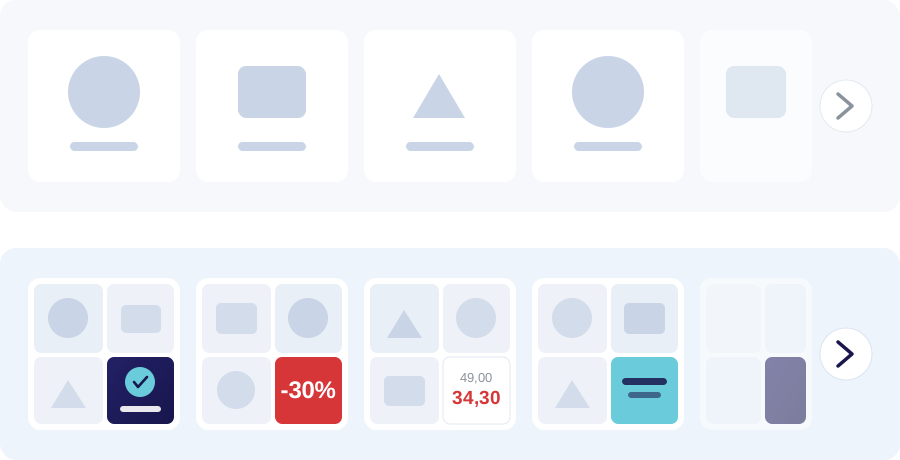
Without the plugin
One tile = one photo. To see another angle or another product, the viewer has to scroll - and most of them do not.
With the plugin
One tile = several photos of the product plus the brand, a discount, the price or your own message. It all lands at first glance.
What it does
- Merges 1, 2, 3 or more photos of the same product into a single square image
- The fourth cell is yours - brand, discount badge, price, text or your own image
- Plugs into CTX Feed as the "FB Canvas Image" attribute
- Ships its own XML feed with a cron job - no second plugin needed
- Caches finished images and rebuilds them only when the product changes
- Colours, font, captions and placement - all configurable
- Bulk generation for the entire catalog in one click (or via WP-CLI)
- Handles thousands of products without hammering your server

The plugin takes the product photos exactly as they are in WooCommerce and returns one finished square image with branding.
It picks the layout for you
Depending on how many photos a product has, the plugin composes differently - with nothing for you to do.

One photo
Photo on the left, branding on the right - a clean 50-50 split.
Two photos
Two stacked rows on the left, a branding column on the right.
Three or more
A grid of three photos plus branding in the fourth cell.
You decide what it says
The fourth cell of the collage is yours - set it once and it applies to the whole catalog.

Brand
Logo or name straight from your WooCommerce taxonomy.
Discount badge
An automatic "-XX%" from the regular versus sale price.
Dual price
The old price struck through and the new one in its own colour.
Your message
Free text - a shipping offer or a campaign line, for instance.
Your own image
A banner or badge from the media library.
Catalog-ready
The images go straight into your feed - your ads look like a campaign, not a list of photos.


The same layout across the whole catalog - recognisable and consistent on Facebook and Instagram.
How it works

Pay online
You enter your site's domain at checkout. Cancel whenever you like.
Get your key right away
Within a minute your licence key, a PDF certificate and a download link land in your inbox.
Upload and activate
Upload the ZIP to WordPress, paste the key and start generating. Done.
Pricing
Pick monthly or yearly. No commitment - cancel any time.
Online payment goes live shortly. Email us at [email protected] and we'll issue a licence right away.
- Licence for 1 domain, unlimited products
- Automatic updates throughout the term
- Email support
- Cancel any time - from your own portal
Frequently asked questions
Does it work with my theme and with WooCommerce?
Yes. The plugin never touches your front end - it generates images and hands them to the feed. You need WordPress 6.0+, PHP 7.4+ and WooCommerce.
Do I need CTX Feed?
Not necessarily. The plugin integrates with CTX Feed, but it also ships its own XML feed with a cron job that you can hand straight to Facebook.
What if I change my domain?
The key works only on the domain it was issued for. Transferring to another domain is possible on request, for a fee - write to us and we'll tell you the terms.
Can I use it on two sites?
Not with one key. Each domain needs its own licence.
What happens if I cancel?
The plugin stops generating new images within 24 hours of cancellation. Images already generated stay on your server.
Do you issue invoices?
Yes - Stripe emails you an invoice automatically. For company details on the invoice, fill in the address fields at checkout or write to us.
Ready to get started?
Contact us for a free consultation and a quote within 24 hours.